 NullPlayer
Command line
nullplayer --cli plays and queries your sources from the terminal without opening the app window. Audio goes to your Mac's speakers or casts to Sonos, Chromecast and DLNA. It also works in automation pipelines, with --json output that other tools can read.
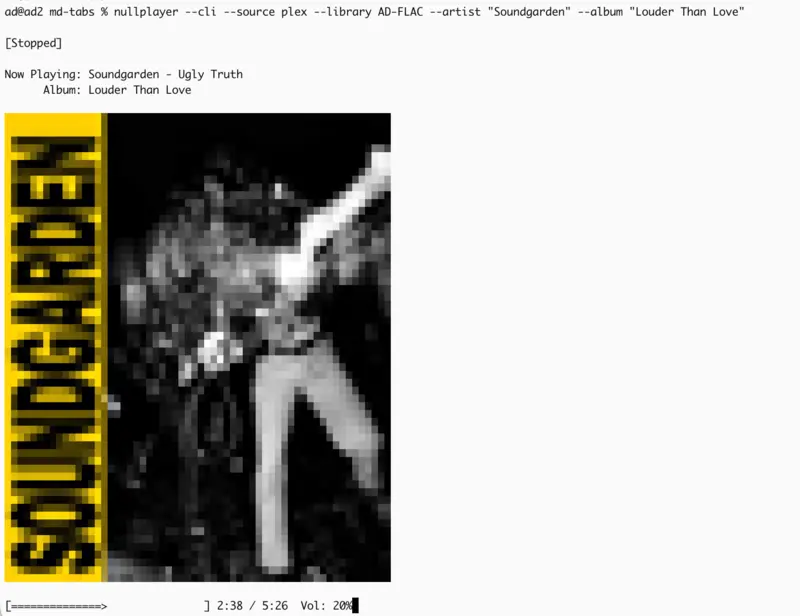
nullplayer --cli --source plex --library AD-FLAC --artist "Soundgarden" --album "Louder Than Love"
What it does
- Plays music by artist, album, genre, playlist or station.
- Lists and searches libraries, playlists, stations, cast devices, audio outputs and EQ presets.
--jsonprints machine-readable output. - Plays to a Mac output or casts to Sonos (multi-room), Chromecast and DLNA.
- Casts video to Chromecast and DLNA TVs.
- Has shuffle, repeat, volume, Reference Tuning and playback keys.
- Draws cover art in the terminal.
Sources and targets
- Sources: local files, Plex, Jellyfin, Emby, Navidrome/Subsonic and internet radio.
- Targets: your Mac's audio outputs, Sonos (including multi-room), Chromecast and DLNA.
- Video: cast local video files and Plex, Jellyfin and Emby movies and shows to Chromecast or DLNA TVs. Video is cast-only in the CLI, and Sonos is audio-only.
nullplayer --cli --source local --artist "Courtney Barnett" --output "MacBook Pro Speakers"
nullplayer --cli --source radio --station "Radio Paradise: Mellow Mix" --cast "Kitchen Speaker" --cast-type chromecast
nullplayer --cli --source plex --playlist "Recently Added" --cast "Living Room,Kitchen,Office" --cast-type sonos
nullplayer --cli --source plex --library Movies --movie "Alien: Romulus" --cast "Living Room TV" --cast-type chromecast
nullplayer --cli --file "/path/to/video.mkv" --cast "Samsung QN90BA 75" --cast-type dlna
With Sonos, the first room is the group coordinator and the rest are grouped onto it.
Browse and search
These print results and exit. Add --json for output a script can read.
nullplayer --cli --list-sources
nullplayer --cli --list-libraries --source plex
nullplayer --cli --list-albums --source plex --library AD-FLAC --artist "Soundgarden"
nullplayer --cli --list-playlists --source plex
nullplayer --cli --list-stations
nullplayer --cli --list-devices
nullplayer --cli --search "soundgarden" --source plex --library AD-FLAC
nullplayer --cli --list-artists --source plex --library AD-FLAC --json
If a Plex server has several music libraries, --library picks one. Without it, the last selected library is used. --list-outputs and --list-eq list audio outputs and EQ presets.
Playback options
nullplayer --cli --source local --artist "Rush" --shuffle
nullplayer --cli --source local --genre "Reggae" --repeat-all
nullplayer --cli --source plex --playlist "All Music" --volume 35
nullplayer --cli --source plex --library AD-FLAC --artist "AC/DC" --tuning 432
--tuning sets Reference Tuning for local output, for example 440 Hz to 432 Hz. It doesn't work while casting.
Keys during playback
| Key | Action |
|---|---|
Space |
Pause or resume |
> / < |
Next or previous track |
→ / ← |
Seek 10 seconds |
↑ / ↓ |
Volume up or down |
s |
Toggle shuffle |
r |
Cycle repeat: off, all, one |
m |
Mute |
i |
Track info |
q |
Quit |
Cover art in the terminal
Album art is color half-blocks on terminals with color support, and monochrome characters otherwise. Force a mode with --color-art or --ascii-art, or turn it off with --no-art. To set a default for one terminal, put export NULLPLAYER_ART=ascii (or color) in its shell profile.
Run nullplayer --cli --help for every flag.