 NullPlayer
Winamp for Mac
There's no official Winamp for Mac that kept the skins. NullPlayer is a free, open-source macOS (14+) player that loads the original skin files, so the look you remember runs on your Mac with your own music playing inside it. If what you miss is the skins, the visualizers and a player that feels like Winamp, NullPlayer is built for that.
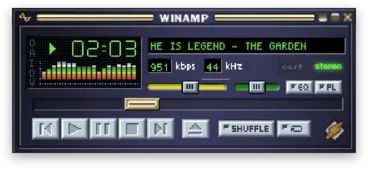
Which Winamp skins work
- Winamp Classic (
.wsz): Winamp 2.x skins, with window snapping and docking. Browse Classic skins. - Winamp Modern (
.wal): Winamp 5 and ClassicPro skins. NullPlayer is the first Mac player to run them, and the only open-source engine. Browse Modern skins.
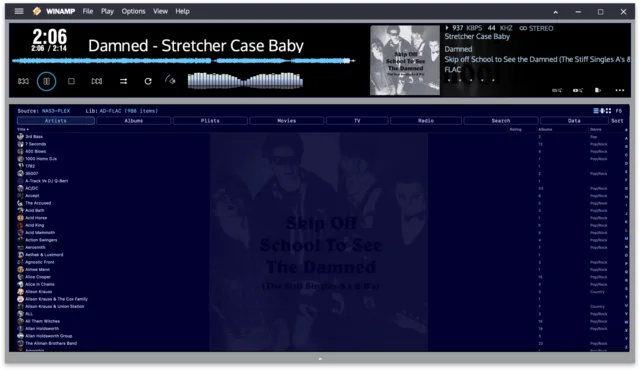
Get started
- Install NullPlayer:
brew install --cask ad-repo/nullplayer/nullplayer, or download the DMG. It's signed and notarized by Apple. - Download skins from the Winamp Skin Museum (Classic) or Winamp Heritage (Classic and Modern). NullPlayer doesn't bundle third-party skins.
- Load a
.wszor.walfile from the Skins menu. You can switch skins mid-song without interrupting playback.
What carries over from Winamp
- Visualizers from the Winamp years: MilkDrop, AVS, Geiss, Tripex, Goom and vis_classic.
- Equalizer, playlist and library windows drawn by your skin and dockable. See Windows.
- Gapless playback, crossfade and a 10-band EQ. See Sound.
What Winamp never had
- Plex, Jellyfin, Emby, Navidrome and YouTube alongside local files. See Libraries.
- Casting to Sonos, Chromecast, AirPlay and DLNA. See Casting.
- A command line and a native macOS app.
- Skins from other players: Windows Media Player, Audion and Sonique.
FAQ
Is there an official Winamp for Mac? Not one that runs Winamp skins. NullPlayer fills that gap.
Is NullPlayer free? Yes. It's free and open source.
Does it run Winamp plugins? No. NullPlayer doesn't run Winamp's .dll plugins. The visualizers are ported to macOS instead.
Which macOS versions are supported? macOS 14 or newer.
Is it affiliated with Winamp? No. NullPlayer is clean-room work and isn't affiliated with Winamp.